Straight Line Courses
The shortest distance between two points is a straight line. But, a straight line is almost never the best or fastest path to hike from one place to another. Many of our navigation tools and techniques push us towards using a straight line for a course. Knowing when to let man made features, the terrain and/or the vegetation direct your course and when to stick close to a straight line, or a sequence of shorter straight lines is a key skill to master as you learn to navigate.
Most of the tools used by land navigators were initially developed for navigating the open oceans and the skies. Both environments where it makes sense to plan a journey as a sequence of straight lines. On the water the forces that work to push you off course are wind and currents. It is not uncommon for the direction your vessel is heading to be different from the direction in which it is actually moving. Traveling cross-country on the ground has a very different set of forces pushing you. For example, you may be influenced by the slope of the land pushing you downslope or into a drainage. You are often making course changes to avoid obstacles both small and large.
When the terrain is easy to follow, there are easily recognized features at the end of your course legs, and any exiting hazards are visible, you probably don’t need to use either your compass or GPSr. Use your map and follow a combination of man made features and the terrain as you progress along your route.
When the terrain is difficult to follow, but the hazards are few and are visible, it’s not so important that you stay on course. You just need to locate the ends of the course legs. Use your GPSr with waypoints at the end of each course leg. You can navigate with separate activation of the GOTO feature for each waypoint or combine them into a route. You will be free to avoid obstacles and pick the easier paths, and your GPSr will always be able to tell you the direction to the end point and how far away it is. You may decide to only use your GPSr occasionally rather than continuously. You may also choose to use your compass to keep you headed in the general direction of the end point. You should realize that as you drift away from the planned course line the compass bearing to the end point will change. You can use the GPSr to get an updated bearing from your current location.
When the terrain is difficult to follow, and there are hazards to be avoided, plan on being able to closely follow your course legs. You may luck out and conditions will allow for a looser more visual method of navigation. But you should be prepared to navigate in poor visibility, darkness, or past invisible hazards. You will likely want to use you GPSr continuously. You may also wish to supplement the GPSr with your compass taking both forward and back bearings when visibility permits.
One of the most common techniques for navigating with a map and compass involves planning a series of short course legs on your map connected by straight lines. Using your compass or a protractor, you measure the direction of each of these course legs. After taking into account the different north references between your map and your compass, you proceed to use your compass to find the direction to hike for that course leg. To assure that you remain on the course line, you will identify landmarks both ahead and behind you on the course. As long as your forward bearings and your back bearings match your course bearing, you are on course. When they differ, it’s time to get back on course by moving in a perpendicular direction to your course.

A well planned course leg will have an easily located feature to mark is end point. If you are relying on the distance traveled to locate the end point, perhaps by counting paces, avoiding obstacles becomes even more complicated. Now you need to count only the forward progress on the course line not your cross track movements around obstacles.
When you are off course, your compass no longer points you towards your destination. Instead, it points to a course that is parallel to your desired course. This is one of the major differences between using a compass and using a GPSr. A GPSr set to navigate to the end of a course leg, will constantly recompute the course from your current location to the end of the leg.
The course your GPSr is describing is still a straight line. But here is the big difference, being off course is usually not a big problem, since the GPSr is still directing you to the end of the leg. This gives you a lot of freedom to maneuver around obstacles and move with the terrain, without having to worry about getting back on the straight line course.
Most of the time your journey will be faster and easier when you have the freedom to work with the terrain. However, whenever there are unseen hazards to either side of your course line, staying on the straight line course is important. Cliffs and swamps are hazards that are usually visible, and can be avoided by sight in the daylight with good visibility conditions. Hazards like snow covered crevices and minefields are not apparent even with the best visibility.
Typically, the end of a course leg is entered into your GPSr using a coordinate measured on your map. When you can preplan your course, it is considerably faster to create a series of waypoints using computer map software and uploading them to your GPSr. It is also possible to create a new waypoint by using a stored waypoint offset by a bearing and distance. Most GPSr have a “project waypoint” feature where you can enter the bearing and distance.
Short course legs are desirable when you plan to use you compass for navigation. The longer the leg the greater the error will be from a small bearing error and the greater potential for a distance measurement error. But if you are planning to use your GPSr, short course legs can be problematic. Your GPSr reports its position it is somewhere in a blob of position error. I usually think of this as a 10m circle. If you are using your current location, as shown by your GPSr, and then projecting it to create a new waypoint, your course leg will have a 10m error circle at each end. For legs that are shorter than 100m, you will likely have better accuracy using a compass. In any event, you should not plan course legs that take you closer than 20m to a hazard when you plan to navigate with your GPSr.

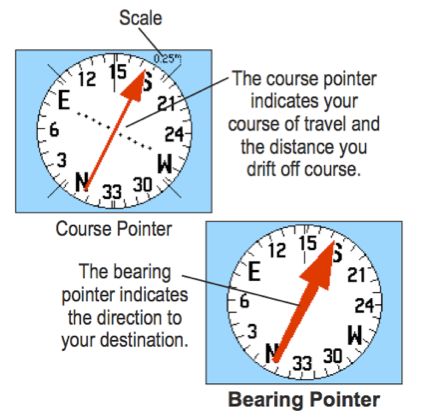
When you want to use your GPSr to travel a straight line course leg where it is important that you stay on course, a single waypoint with the GOTO feature is not sufficient. You will need to create a route with at least two waypoints. Once you have started your GPSr navigating the route, you will want to find the screen with the “compass display” and activate its course or CDI (course direction indicator) mode. In course mode the arrow that points to the next waypoint has an offset line to indicate how far and in what direction you are off course. Make sure to check the settings for the course pointer. You will want small off course distances to be visible on the pointer when you are traveling by foot. In an airplane or boat being a few hundred meters off course is usually of no significance, and you would only want larger course errors to show on the course pointer.
- Check that the map datum on your map matched the setting in your GPSr
- Check the north reference setting on your GPSr and compass. Review the current declination and any conversions you will need to make as you move between the map, your compass, and your GPSr.
- Check the distance setting for the course pointer or CDI on your GPSr.
- If you have many waypoints in your course plan, consider using your computer to create and upload them to your GPSr.