Using a UTM Slot Style Tool
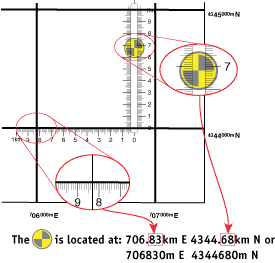
• Position the base of the tool on the southern grid line. Slide the tool E-W until the target
is centered in the slot.
• Read the Easting value for the grid from the edge of the map.
• Read the additional Easting digits from the E-W ruler where it crosses the western grid
line.
• Read the Northing value for the grid from the edge of the map.
• Read the additional Northing digits from the N-S ruler where it crosses the target.
Overlays containing UTM Slot Style Tools for several different map scales are available from MapTools.
The interactive UTM tutorial runs these same steps as an animation on a real topographic map —
the tool settling onto the southern grid line, the fit check against the northern line, then the
slide E-W and the two scale readings:
Read a coordinate with a slot style tool
Plot a coordinate with a slot style tool
